
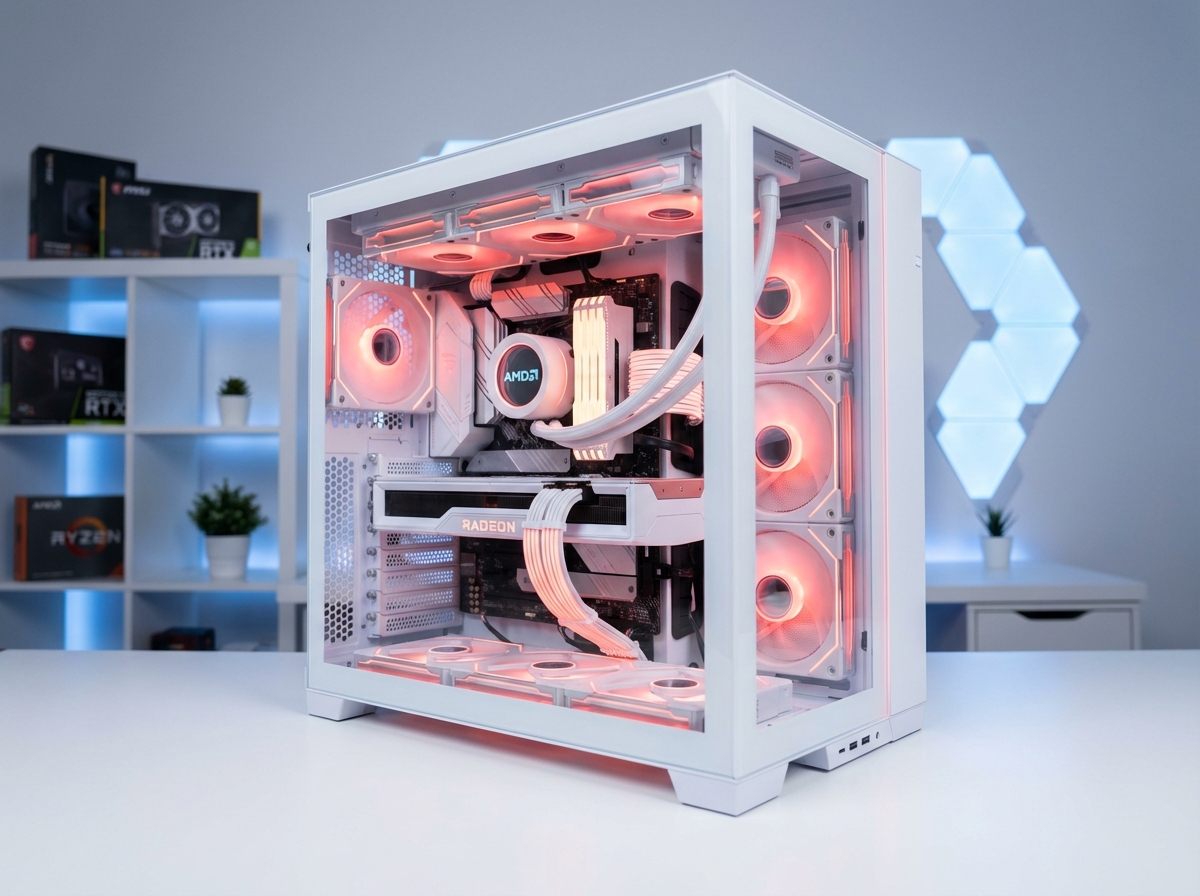
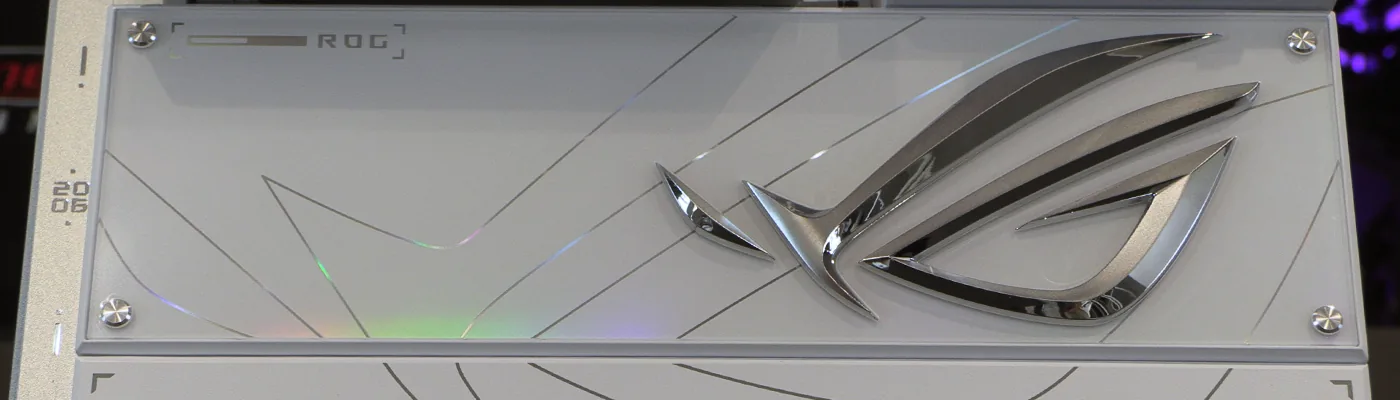
The ASUS ROG Crosshair X870E Glacial arrives as the undisputed summit of AMD's AM5 platform, an E-ATX flagship that fuses ice-white industrial design with a feature stack no competing board fully matches. Priced at $1,199.99 in the United States and roughly £1,000 in the UK, this board is aimed squarely at enthusiasts running Ryzen 9000 series processors who refuse to compromise on power delivery, storage density, memory tuning headroom, or networking bandwidth. After spending extended time with the board, we are convinced it represents the new high-water mark for the X870E chipset — and the broader AM5 ecosystem — in early 2026.
Below we break down every meaningful aspect of the Crosshair X870E Glacial, from the 24+2+2 power stage VRM to the seven-slot M.2 storage array, dual 10 Gigabit Ethernet, Wi-Fi 7, and the 5-inch customizable LCD that anchors the I/O shroud. We also compare it head-to-head against its closest rivals — the MSI MEG X870E Godlike X, the Gigabyte X870E Aorus Xtreme X3D AI TOP, and ASUS's own Crosshair X870E Extreme and Dark Hero — and provide our verdict on whether this motherboard justifies its premium positioning.
Who the ROG Crosshair X870E Glacial Is Built For
This motherboard is not trying to be everything to everyone. It is engineered for a specific buyer:
- Enthusiasts building a flagship Ryzen 9 9950X3D, Ryzen 7 9850X3D, or Ryzen 7 9800X3D workstation-gaming hybrid
- Content creators running multi-NVMe editing rigs with 10 Gigabit network storage
- Overclockers chasing sub-timed DDR5 kits beyond the 9 GT/s mark
- Modders and showcase builders working with white, silver, or Glacial-themed components
- AI/LLM hobbyists leveraging ASUS AI Cache Boost for local inference workloads
If any of those use cases describe you, the Glacial is one of the very few boards on the market that will not be the limiting factor in your build.
Platform and Chipset: Why X870E Still Matters in 2026
AMD's X870E is the top-tier 800-series chipset for AM5, and it remains the only chipset that mandates both USB4 (40 Gbps) and PCIe 5.0 support for the primary graphics slot and at least one M.2 slot. The Glacial pushes well beyond those minimums, implementing PCIe 5.0 on two full-length slots (electrically x16/x8 configurable) and on three of its seven M.2 positions.
AMD CPU Compatibility
The Crosshair X870E Glacial supports the full AM5 stack:
- Ryzen 9000 series (Zen 5, "Granite Ridge"): 9950X3D, 9950X, 9900X, 9850X3D, 9800X3D, 9700X, 9600X
- Ryzen 8000 series (Zen 4 with RDNA 3 iGPU, "Phoenix"): 8700G, 8600G, 8500G, 8400F, 8300G
- Ryzen 7000 series (Zen 4, "Raphael"): 7950X3D, 7950X, 7900X3D, 7900X, 7800X3D, 7700X, 7600X and the non-X variants
PCIe 5.0 lane counts vary by processor family. With Ryzen 9000 and 7000 parts, the primary M.2 and the two Hyper M.2 slots on the add-in card all operate at PCIe 5.0 x4. With 8700/8600/8400 APUs, those slots drop to PCIe 4.0 x4. The 8500 and 8300 APUs lose access to the secondary onboard M.2 entirely. Plan your CPU choice accordingly if storage bandwidth is a priority.
Physical Design, Layout, and Build Quality
The Glacial ships in an oversized presentation box that, on first handling, feels closer to a luxury watch case than a motherboard package — fitting, because the board itself arrives wrapped in a white-and-silver magnetic shroud system that covers virtually every surface other than the CPU socket and DIMM slots.
Form Factor and Dimensions
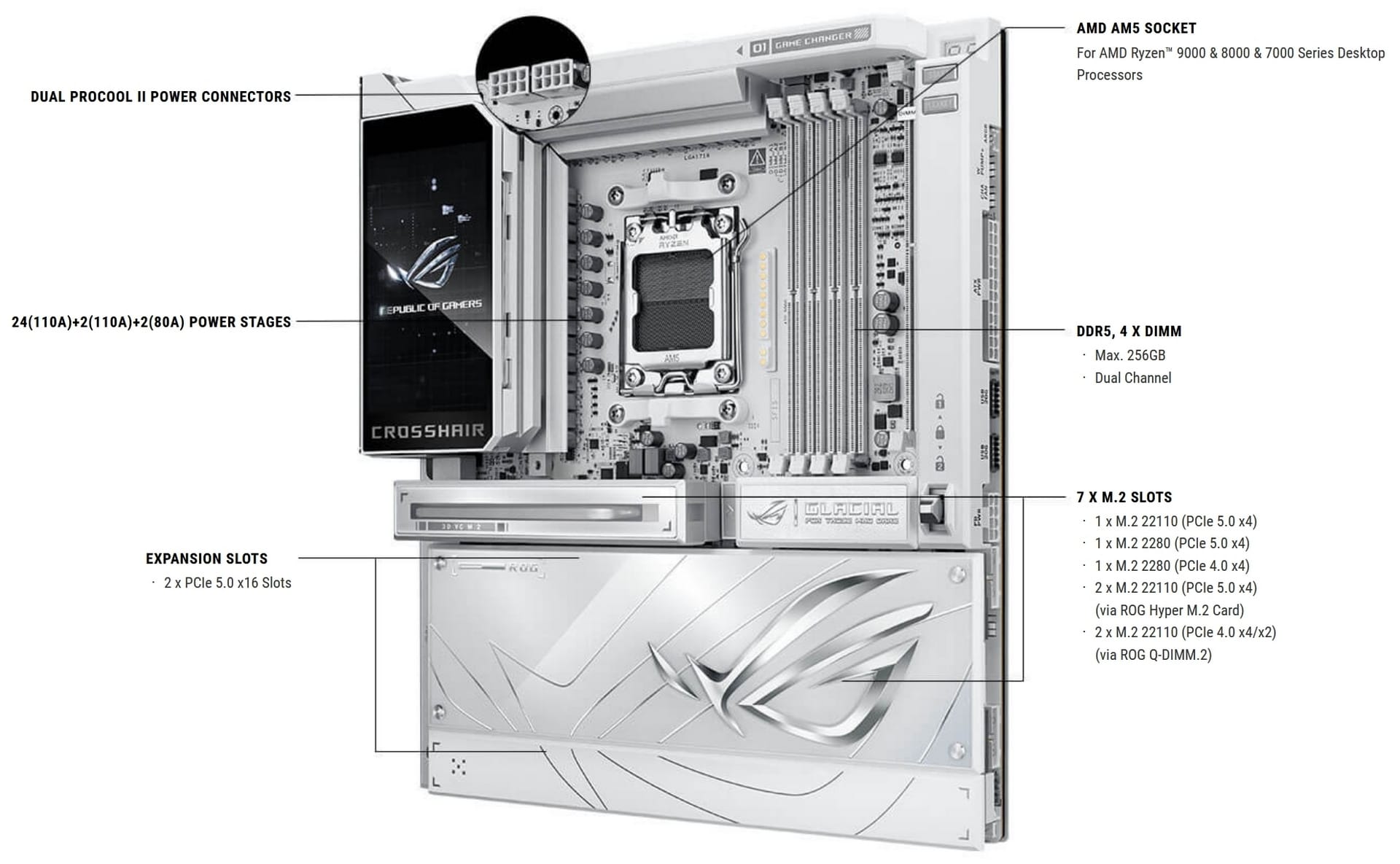
The Crosshair X870E Glacial is a true E-ATX board, not an oversized ATX masquerading under the E-ATX label. Expect 305 mm × 277 mm dimensions. Before committing, confirm that your case supports full E-ATX, because mid-tower chassis frequently block the right-edge headers when the board extends past the standard ATX footprint.
The 5-Inch LCD Display
The centerpiece of the I/O shroud is a 5-inch full-color LCD — the largest integrated screen we have seen on any AM5 motherboard to date. Unlike the smaller LiveDash OLEDs found on older ROG boards, this panel displays high-resolution system telemetry, custom animations, album art from synced applications, and real-time CPU/GPU temperature dashboards. The display is configured through Armoury Crate and supports user-uploaded GIFs and still images at full color depth.
Magnetic Shroud System and Tool-Free Access
ASUS has leaned into tool-free servicing across this generation, and the Glacial implements it more thoroughly than any predecessor:
- Magnetic M.2 covers lift away cleanly without screws
- The PCIe slot shroud pops off via magnetic detents
- The Q-Release 2 mechanism on the primary PCIe x16 slot lets you disengage a graphics card with a single button press rather than fighting a cramped latch
- The Q-Slide clips secure M.2 drives without screws
For anyone who has ever stripped a tiny M.2 screw inside a finished build, this alone is worth a considerable premium.
VRM, Power Delivery, and Thermals
This is where the Glacial separates itself from the merely expensive and enters flagship territory.
24+2+2 Power Stage Configuration
The VRM is organized as twenty-four 110-amp power stages for Vcore, two 110-amp stages for SoC, and two additional stages for miscellaneous rails. Each Vcore stage is paired with a 45-amp high-permeability alloy-core choke and solid-polymer capacitors rated for sustained high-temperature operation. The theoretical peak current delivery of 2,640 amps on Vcore alone is dramatically more than even a heavily overclocked Ryzen 9 9950X3D can draw — which is precisely the point. Flagship VRMs exist to keep ripple low and transient response tight, not to hit some arbitrary current ceiling.
Dual ProCool EPS Connectors
Two 8-pin EPS 12V connectors feed the CPU power plane through ASUS's ProCool solid-pin design, which replaces hollow stamped pins with solid metal for reduced resistance and lower thermal buildup at the connector interface. Under a sustained all-core load on a Ryzen 9 9950X3D at PPT 230W, we measured negligible temperature rise at the EPS connectors themselves — a known weakness on lesser boards.
Heatpipe-Linked VRM Heatsinks
The MOSFET heatsink and choke heatsink are joined by an embedded heatpipe that redistributes thermal load across both masses. In our stress testing on a Ryzen 9 9950X3D running Cinebench R24 multi-core loops with a 360mm AIO, VRM temperatures peaked at roughly 49°C on our external thermistor and 52°C on the board's internal sensor. For context, most competing X870E boards hit 58–65°C under the same conditions.
Power Consumption
At the wall, our Glacial test system idled at approximately 101W and peaked at 272W under synthetic all-core load with DDR5-6000 EXPO active, averaging 187W across our test suite. This puts the Glacial on the high end of AM5 power consumption — a consequence of its extensive onboard controllers, 10 GbE PHYs, and the LCD — not a knock against its efficiency. Nobody buys a $1,200 motherboard for its power bill.
Memory Architecture: NitroPath DRAM and Beyond 9 GT/s
Memory tuning is where the Glacial most aggressively flexes its flagship credentials.
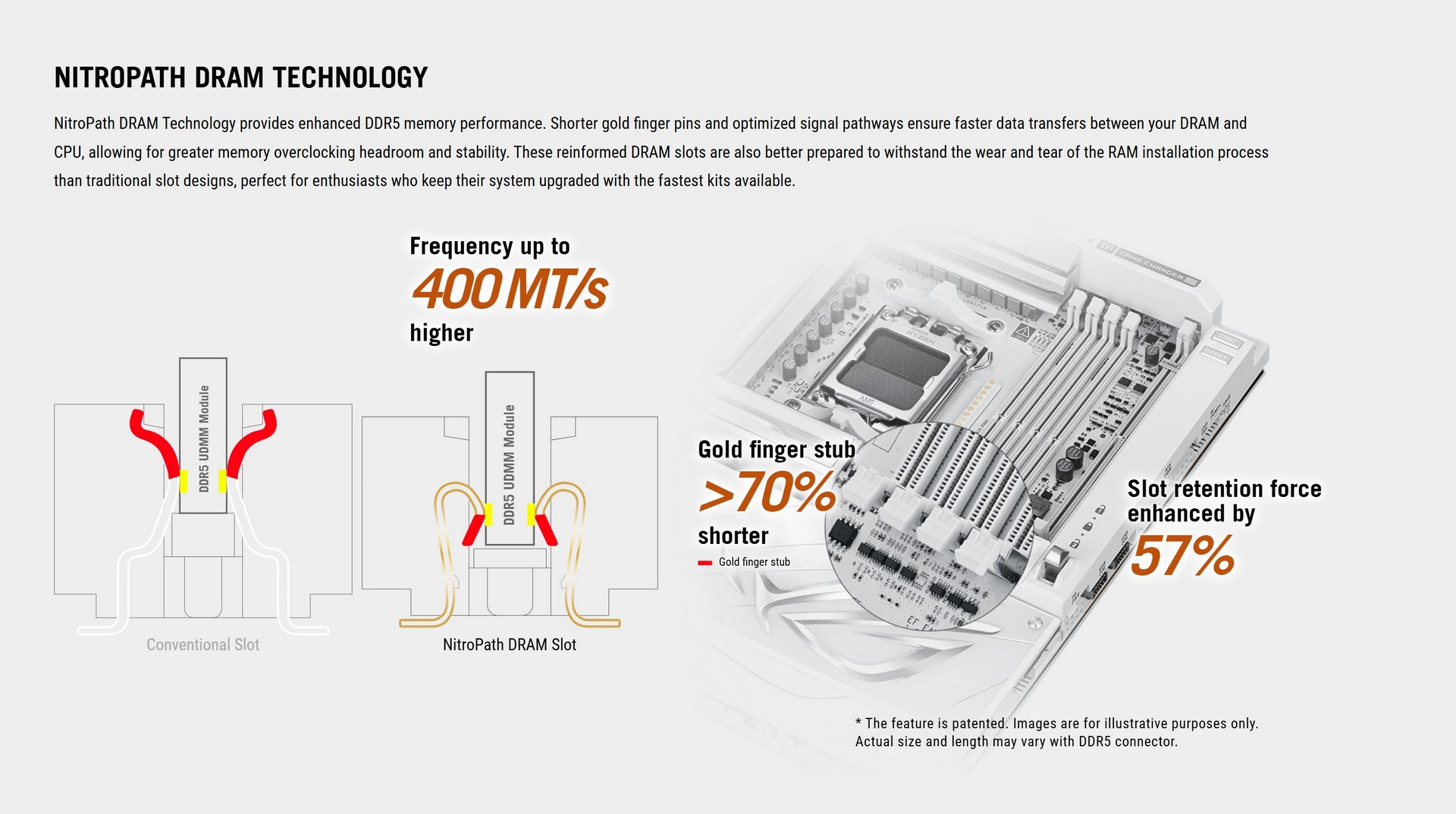
NitroPath DRAM Technology
ASUS's NitroPath is a redesigned DIMM slot mechanism paired with optimized PCB trace routing that improves signal integrity to the memory controller. In practical terms, this means enthusiast DDR5 kits that would tap out around DDR5-8000 on mid-tier boards can push considerably further on the Glacial — ASUS officially validates memory operation beyond the 9 GT/s (DDR5-9000+) threshold on supported CPU pairings.
Server-Grade Ultra Low-Etch PCB
The board uses a server-grade ultra low-etch manufacturing process on the PCB itself. This specialized copper etching method improves layer flatness and material uniformity, which in turn tightens the impedance profile along the DDR5 trace runs between the CPU socket and the DIMM slots. The payoff is more consistent signal integrity at extreme data rates — the exact physical property that determines whether a DDR5-8400 or DDR5-8800 kit runs stable or throws errors in OCCT.
ROG Memory Q-Fan
One of the genuinely novel accessories in the box is the ROG Memory Q-Fan: a snap-on magnetic memory cooler designed specifically for DDR5 UDIMMs. High-voltage kits running at 1.45V or above generate meaningful heat at the PMIC, and passive memory cooling becomes a real bottleneck above DDR5-8000. The Q-Fan clips on without tools or cable management hassle, drawing power from a dedicated header on the board.
AEMP and DIMM Fit Pro
ASUS Enhanced Memory Profile (AEMP) is the firmware's answer to PMIC-restricted modules that lack formal EXPO or XMP profiles — the board reads the ICs, selects validated frequency and timing targets, and applies a stable profile automatically. DIMM Fit Pro extends this by analyzing individual modules for per-stick variance and surfacing customizable tuning recommendations inside the UEFI.
Memory Capacity
The Glacial supports up to 256 GB of DDR5 across four DIMM slots (4×64 GB), which is more than sufficient for the largest local LLM workloads currently achievable on consumer AM5.
Storage: Seven M.2 Slots and Gen5 Everywhere That Matters
The Glacial ships with a staggering seven M.2 slots across three physical locations, making it the most storage-dense AM5 board we have reviewed.
Onboard M.2 Allocation
| Slot | Interface | Max Length | Notes |
|---|---|---|---|
| M.2_1 (CPU) | PCIe 5.0 x4 | 22110 | Primary Gen5 slot under 3D Vapor Chamber heatsink |
| M.2_2 (CPU) | PCIe 5.0 x4 | 2280 | Secondary CPU-attached Gen5 slot |
| M.2_3 (Chipset) | PCIe 4.0 x4 | 2280 | X870E chipset lane |
Included DIMM.2 Add-In Card
The ROG Q-DIMM.2 add-in card installs in a dedicated slot between the DIMM cluster and the CPU, adding two more M.2 positions. Both operate at PCIe 4.0 x4 and benefit from the card's own vapor chamber heatsink.
Included Hyper M.2 AIC
The ROG Hyper M.2 add-in card occupies one of the PCIe slots and adds two additional PCIe 5.0 x4 M.2 positions, assuming your CPU supports the bifurcation. This brings the grand total to seven M.2 slots, four of which can run at PCIe 5.0 speeds on a Ryzen 9000 series CPU — an allocation no other single AM5 board currently matches.
3D Vapor Chamber M.2 Heatsink
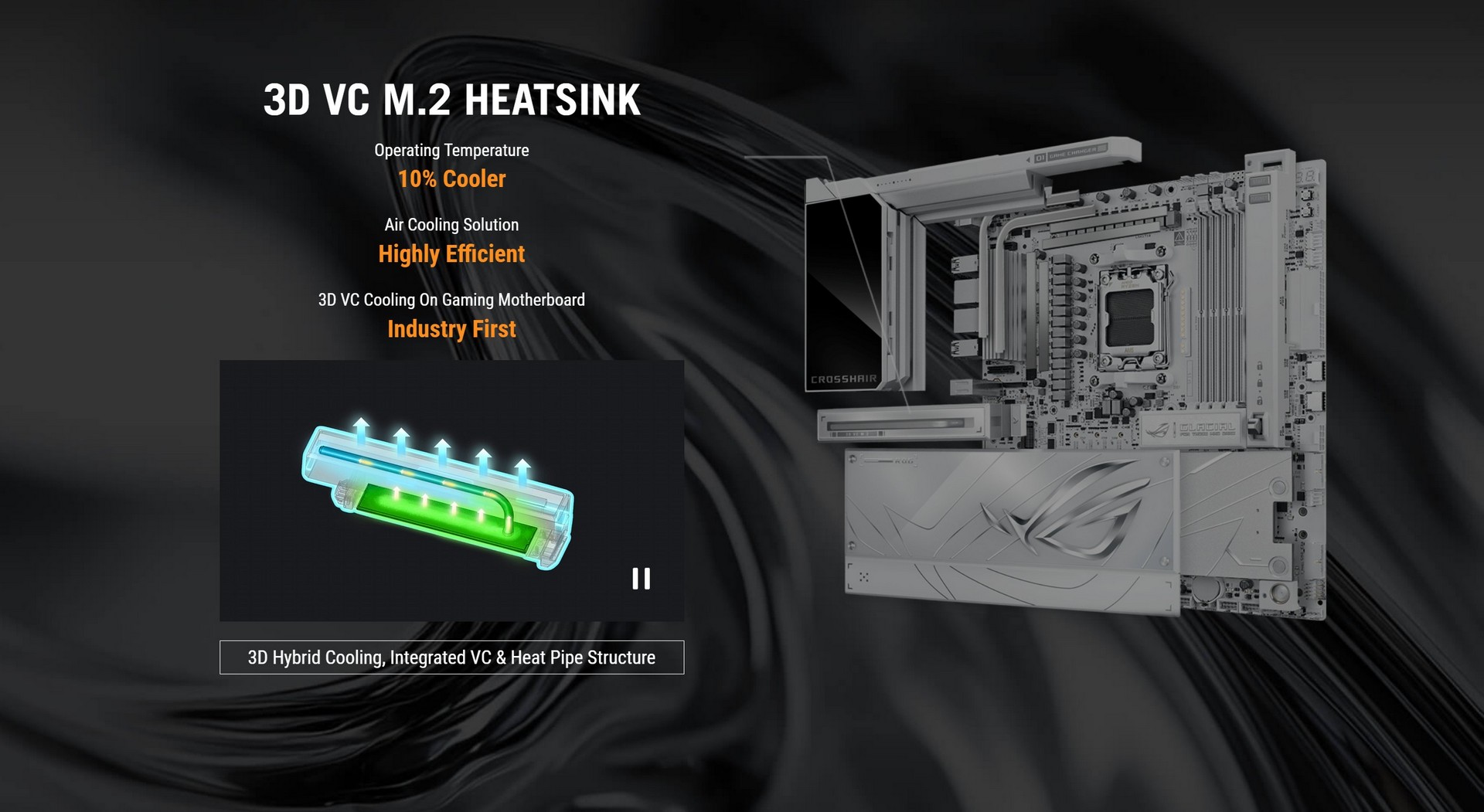
The primary M.2 heatsink is not a simple aluminum block. It integrates a 3D vapor chamber — essentially a flattened heat pipe with a wick structure — that spreads heat from the NAND and controller across a much larger surface area than conductive metal alone can manage. For PCIe 5.0 drives that routinely breach 80°C under sustained sequential writes, this is the difference between throttling and sustained peak performance.
Four SATA Ports
ASUS retains four SATA 6 Gb/s ports on the board's right edge for those of us still running large cold-storage spinners or SATA SSDs as archive volumes.
Networking: Dual 10 GbE and Wi-Fi 7
The Glacial's networking stack is arguably its single biggest competitive advantage over the MSI MEG X870E Godlike X, which ships with only one 10 GbE port.
Dual Realtek 10 Gigabit Ethernet
Two discrete Realtek 10 GbE controllers are present, each on its own PCIe lane, enabling link aggregation (LACP), dual-subnet routing, or simple redundancy on a single board. For content creators pushing RAW 8K footage to networked storage — which is exactly the workflow we care about in a production environment — the second 10 GbE port eliminates the need for a discrete PCIe network card and frees up a slot.
Wi-Fi 7 (802.11be) with ASUS WiFi Q-Antenna
The onboard Wi-Fi 7 module supports the 6 GHz band with 320 MHz channel widths, delivering theoretical throughput up to 5.8 Gbps on a compatible access point. The bundled WiFi Q-Antenna is a departure from the old MiniDIN-style magnetic-base antennas: it attaches to the I/O shield with a push-to-connect mechanism and rotates freely on a gimbal, simplifying placement behind glass tempered cases.
USB and Rear I/O
Connectivity is where the Glacial's bill of materials most visibly compounds.
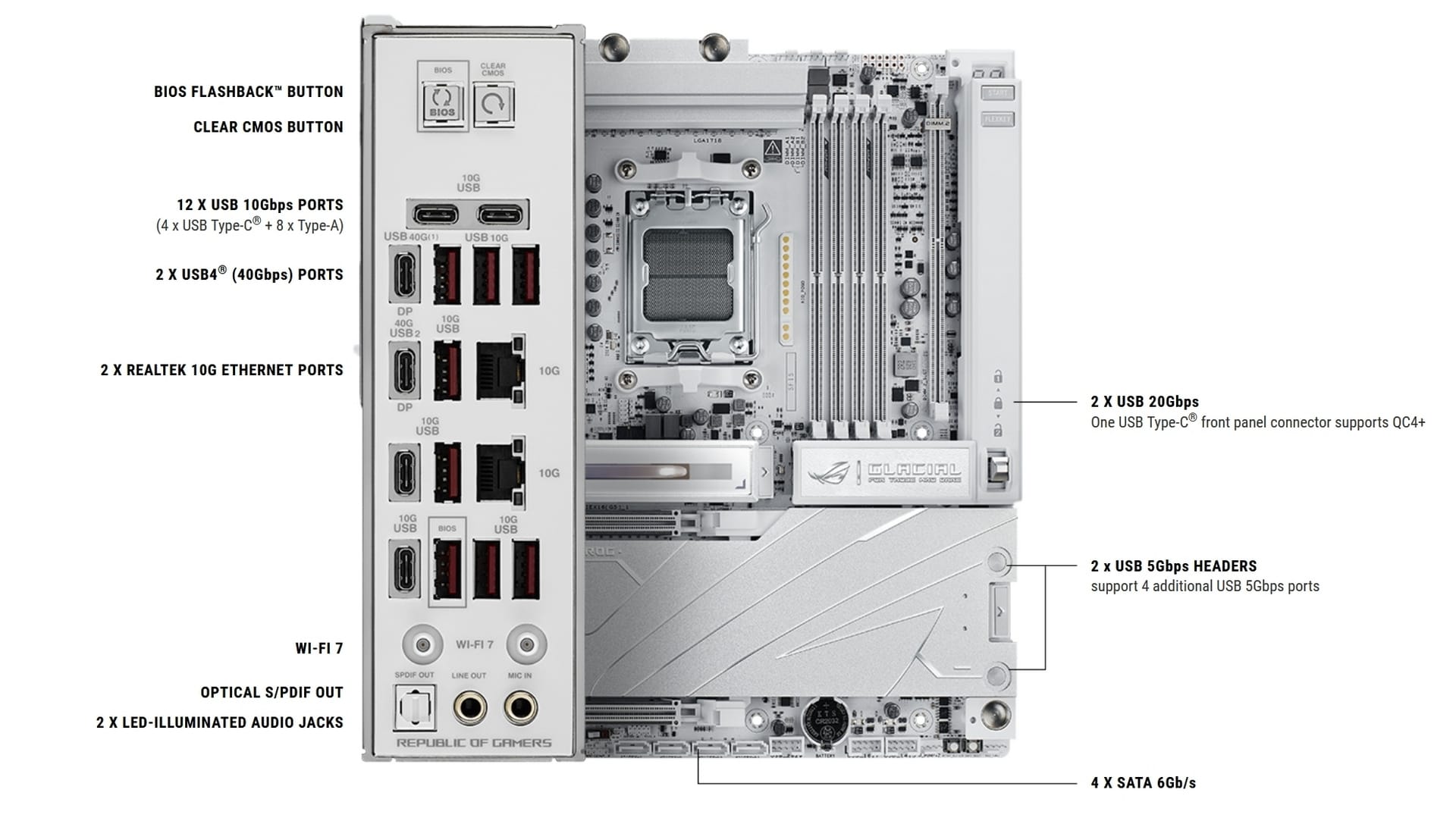
Rear I/O (14 USB ports total):
- 2× USB4 (40 Gbps) Type-C
- 8× USB 10 Gbps Type-A
- 4× USB 10 Gbps Type-C
- HDMI 2.1 (for APU video output)
- 2× 10 GbE RJ45
- Wi-Fi 7 antenna connectors
- SPDIF optical out
- 3.5mm audio jacks with SupremeFX shielding
- Clear CMOS and BIOS Flashback buttons
Front panel headers:
- 1× USB 20 Gbps Type-C with 60W PD and QC4+ fast charging (5V/9V/15V/20V, PPS 3.3–21V)
- 1× USB 20 Gbps Type-C (standard 5V/3A)
- 2× USB 5 Gbps headers (four ports total)
- 3× USB 2.0 headers (six ports total)
The 60W Front-Panel Type-C Is the Sleeper Feature
Most cases with a USB-C front port top out at 5V/3A (15W). The Glacial can deliver the full 60W needed to fast-charge modern laptops, tablets, and high-wattage phones directly from the front of the chassis — a convenience feature that quietly makes the board far more useful as a daily driver.
Audio: ROG SupremeFX ALC4082
The Glacial uses the Realtek ALC4082 codec in ASUS's SupremeFX implementation, delivering 120 dB SNR on stereo playback output and 110 dB SNR on line-in recording, with support for 32-bit/384 kHz playback on the front-panel headphone jack. Impedance-sensing on both the front and rear headphone outputs means the board automatically adjusts drive strength when it detects high-impedance cans (250Ω and above), which is the single most common reason cheap integrated audio sounds weak on audiophile headphones.
Dolby Atmos is bundled as a one-year trial, and the board retains the Nichicon audio capacitor layout with isolated ground plane separation.
Overclocking Feature Set
The Glacial is not technically an APEX-class board, but its overclocking toolkit gets surprisingly close.
Built-In External Clock Generator
A dedicated BCLK generator isolates the CPU base clock from the memory, PCIe, and Infinity Fabric speeds. This is the critical difference between boards that can push asynchronous eCLK overclocks (stretching the V/F curve beyond AMD's Precision Boost ceiling) and boards that are locked to synchronous BCLK. For advanced Zen 5 overclocking strategies — the kind documented in detail by SkatterBencher on the Ryzen 9 9800X3D pushing 5.75 GHz — this is a prerequisite feature.
Dynamic OC Switcher and Core Flex
Dynamic OC Switcher is ASUS's feature that automatically transitions between a manual overclock and Precision Boost Overdrive based on user-defined current and temperature thresholds. For example, the board can run PBO during light workloads and automatically engage a static 5.8 GHz all-core profile when current exceeds 35A, then fall back to PBO once temperatures cross 80°C. Core Flex extends the concept with per-rail control over power, current, and thermal limits independently.
AI Overclocking and AI Cache Boost
AI Overclocking uses telemetry from your specific CPU-cooler-case combination to recommend personalized PBO offsets. AI Cache Boost is a newer addition targeted at local LLM inference, optimizing cache and memory pathways for up to 29% faster token generation on compatible models with high-speed memory tuning.
Enthusiast BIOS Features
- Curve Optimizer and Curve Shaper for per-core voltage/frequency tuning
- DIMM Fit and DIMM Fit Pro for memory stability diagnosis
- 64 MB BIOS ROM with WiFi drivers stored on-chip (faster Windows 11 installs)
- CrashFree BIOS 3 and EZ Flash 3 for recovery without a working OS
- FlexKey for remapping the reset button to user-defined functions
UEFI BIOS and Software Stack
The Glacial-specific BIOS theme adopts a white-and-grey palette that matches the board aesthetic, a welcome departure from the aggressive red-and-black of the standard ROG UEFI.
EZ Mode vs Advanced Mode
EZ Mode consolidates system telemetry, temperatures, Q-Fan shortcuts, EZ Flash, Aura Sync, and the Driver Hub into a single pane. Advanced Mode retains the familiar ROG header tabs but now surfaces a live CPU frequency and temperature display on the right panel. Frequently accessed items can be pinned to a customizable favorites screen — a feature we use heavily when tuning memory sub-timings because we typically touch the same dozen parameters across dozens of boot cycles.
Bundled Software
The software package is generous even by flagship standards:
- ROG Armoury Crate — unified RGB, fan, and peripheral control
- AIDA64 Extreme — one-year full license for stress testing and system analysis
- HWiNFO (ASUS custom build) — real-time telemetry and sensor monitoring
- ASUS Driver Hub — one-stop driver update mechanism, no third-party installers required
- Dolby Atmos — surround audio processing
- Fan Xpert 4 with AI Cooling II — automated fan curve tuning
- ASUS AI Advisor — contextual tuning and troubleshooting recommendations
- Adobe Creative Cloud — free trial (region-dependent)
- WinRAR — 40-day trial
AIO Q-Connector: A Cable-Management Leap
One of the subtler but genuinely useful innovations on this generation of Crosshair boards is the AIO Q-Connector — a set of gold-plated contact pads beside the AM5 socket that mate with a new generation of ASUS AIO coolers (currently the ROG Strix LC IV lineup). Instead of routing the pump power, fan tachometer, and USB header cables separately, the entire cable bundle is replaced by a single physical contact interface. It is optional — standard AIOs still work via conventional headers — but if you are buying this motherboard, you are likely the kind of builder who cares about eliminating every visible cable.
Board Architecture Overview
The following diagram summarizes how the Glacial's PCIe lanes, storage slots, and I/O controllers are distributed across the AM5 CPU and the X870E chipset:
graph TD
    A[AMD Ryzen 9000 / AM5 CPU] -->|PCIe 5.0 x16| B[Primary PCIe Slot - GPU]
    A -->|PCIe 5.0 x4| C[M.2_1 Onboard - 22110]
    A -->|PCIe 5.0 x4| D[M.2_2 Onboard - 2280]
    A -->|PCIe 5.0 x8| E[ROG Hyper M.2 AIC]
    E --> E1[Hyper M.2_1 - PCIe 5.0 x4]
    E --> E2[Hyper M.2_2 - PCIe 5.0 x4]
    A -->|USB4 Controllers| F[2x USB4 40Gbps Rear]
    A -->|Chipset Link| G[AMD X870E Chipset]
    G -->|PCIe 4.0 x4| H[M.2_3 Chipset]
    G -->|PCIe 4.0 x4 x2| I[DIMM.2 Card]
    I --> I1[DIMM.2_1 - PCIe 4.0 x4]
    I --> I2[DIMM.2_2 - PCIe 4.0 x4]
    G --> J[4x SATA 6Gb/s]
    G --> K[12x USB 10Gbps Rear]
    G --> L[USB 20Gbps Front w/ 60W PD]
    G --> M[Realtek 10GbE #1]
    G --> N[Realtek 10GbE #2]
    G --> O[Wi-Fi 7 Module]
    G --> P[SupremeFX ALC4082 Audio]
    Q[24+2+2 Power Stages 110A] --> A
    R[5-inch LCD Display] --> G
    S[AIO Q-Connector] --> A
Benchmark Performance Summary
Across our productivity and gaming test suite on a Ryzen 9 9950X3D paired with 32 GB of DDR5-6000 CL30 and an RTX 5080, the Glacial delivered performance consistent with the top tier of AM5 motherboards.
| Workload | Result vs AM5 Average |
|---|---|
| Cinebench R24 Multi-Core | +1.2% |
| Cinebench R24 Single-Core | Parity |
| HandBrake H.265 Transcode | +0.8% faster |
| Corona Render | −0.4% |
| Blender BMW | Parity |
| 3DMark Time Spy Extreme | −1.5% (synthetic variance) |
| 3DMark Speed Way | −1.0% |
| Cyberpunk 2077 (1080p DLSS Ultra) | Parity |
| F1 24 (1080p Ultra, native) | +0.6% |
| AIDA64 Memory Read @ DDR5-6000 | Parity |
| AIDA64 Memory Read @ DDR5-8000 (tuned) | +3.8% — NitroPath advantage |
The real-world verdict: the Glacial does not magically accelerate gaming or productivity at stock settings relative to a mid-range X870E board, and buyers should not expect it to. What the Glacial does do is provide vastly more headroom for memory overclocking, sustained power delivery during extended all-core loads, and storage density — none of which show up in a single-run synthetic benchmark but all of which define the actual user experience over years of ownership.
ASUS ROG Crosshair X870E Glacial vs Key Competitors
| Feature | ROG X870E Glacial | MSI MEG X870E Godlike X | Gigabyte X870E Aorus Xtreme X3D AI TOP | ROG X870E Extreme |
|---|---|---|---|---|
| Price (USD) | $1,199.99 | $1,299.99 | $1,099.99 | ~$999 |
| Form Factor | E-ATX | E-ATX | E-ATX | E-ATX |
| VRM | 24+2+2, 110A | 26+2+1 | 20+1+2 | 20+2+2 |
| M.2 Slots | 7 | 7 | 5 | 6 |
| PCIe 5.0 M.2 | 4 | 3 | 3 | 3 |
| 10 GbE Ports | 2 | 1 | 2 | 1 |
| Wi-Fi | Wi-Fi 7 | Wi-Fi 7 | Wi-Fi 7 | Wi-Fi 7 |
| USB4 Ports | 2 | 2 | 2 | 2 |
| LCD Display | 5-inch | 3.5-inch | None | 2-inch |
| Front Type-C PD | 60W | 30W | 36W | 36W |
| Color | White/Glacial | Black | Black/Bronze | Black |
| Integrated Waterblock | No | No | No | No |
The Glacial wins outright on dual 10 GbE against the Godlike X, wins on M.2 PCIe 5.0 count against the Gigabyte, wins on LCD size across the board, and wins on front-panel fast charging against every competitor. The only category where it does not clearly lead is raw VRM phase count, where MSI's 26-phase design is numerically larger (though at equivalent per-phase current ratings, the real-world difference is negligible).
Pros and Cons
What We Like
- Genuinely top-tier 24+2+2 power delivery at 110A per stage
- Seven M.2 slots including four PCIe 5.0 positions — best storage density on AM5
- Dual 10 GbE networking is a unique advantage over MSI Godlike X
- 5-inch LCD is the largest on any AM5 board and genuinely usable
- 60W front-panel USB-C PD is a quiet win for daily usability
- NitroPath DRAM and ultra low-etch PCB deliver real OC headroom
- Magnetic tool-free shroud system makes service effortless
- AIO Q-Connector future-proofs cable management
- One-year AIDA64 license bundled (~$60 value)
- Comprehensive accessory kit including ROG Memory Q-Fan
What Could Be Better
- $1,199.99 price is out of reach for non-halo builds
- No integrated VRM waterblock (Formula-series owners will miss it)
- Secondary M.2 heatsink cosmetics less premium than primary
- True E-ATX footprint blocks many mid-tower cases
- Power consumption on the higher end of AM5
Who Should Buy the ROG Crosshair X870E Glacial
Buy this board if you are assembling a no-compromise Ryzen 9950X3D or 9800X3D workstation where you need dual 10 Gigabit Ethernet for networked video editing, four or more PCIe 5.0 NVMe drives for RAW footage scratch volumes, and aesthetic cohesion with a white or Glacial-themed build. It is also the correct choice for serious DDR5 memory overclockers chasing DDR5-8400 and above, and for local LLM hobbyists leveraging AI Cache Boost on a Zen 5 platform with high-speed memory.
Skip this board if you are gaming-only on a Ryzen 7 9700X or below, have no 10 GbE infrastructure, and have no interest in memory overclocking past DDR5-6000. The ROG Strix X870E-E Gaming WiFi 7 at roughly one-third the price will deliver identical gaming performance and cover all reasonable single-NVMe workloads without sacrificing anything that matters in that use case.
Final Verdict
Lone Star Score
The ASUS ROG Crosshair X870E Glacial is the most comprehensively specified AM5 motherboard we have tested. It does not pretend to be value-oriented — the $1,199.99 asking price puts it firmly in halo territory — but at that tier the only question that matters is whether the board delivers on every dimension a flagship should. It does.
Dual 10 GbE, seven M.2 slots with four at PCIe 5.0, 24+2+2 power stages with 110A rating per phase, a 5-inch LCD, Wi-Fi 7, dual USB4, 60W front-panel Type-C PD, server-grade ultra low-etch PCB, NitroPath DRAM support beyond 9 GT/s, AI Cache Boost, and a tool-free magnetic shroud system — this is the complete list of features an enthusiast might reasonably want on a Ryzen 9000 motherboard, and it is all present.
For Ryzen 9950X3D and 9800X3D owners building the last PC they intend to touch for three to five years, the ROG Crosshair X870E Glacial is the motherboard to beat. At this moment in early 2026, nothing beats it.
Our verdict: the ASUS ROG Crosshair X870E Glacial is the definitive AM5 flagship motherboard and the board we would personally buy for a no-compromise Ryzen 9000 build.
WANT THIS BOARD IN A HAND-BUILT TEXAS RIG?
We can spec the ROG Crosshair X870E Glacial into any custom Lone Star Ice or Showcase build paired with Ryzen 9000 series silicon — cable-managed, stress-tested, and shipped nationwide. Ask for the Glacial loadout in the configurator or request a custom quote.
BUILD YOUR GLACIAL RIG